%201.svg)
When planners check on shipments, they rarely start with a container number. They start with a purchase order:
- Is it arriving on time?
- Which products are still in transit?
- What orders are at risk of being delayed?
That sounds simple, but most visibility platforms are built around containers, not orders. A single purchase order can span multiple containers and bookings, while one container can carry products from several orders. As a result, teams often track containers individually and piece together the bigger picture in spreadsheets.
Adding PO data to shipment visibility is not new. The real challenge is turning that data into actionable order-level insight: knowing which orders are at risk, what products could be impacted, and where teams need to act.
That's where Portcast's Order Intelligence comes in.
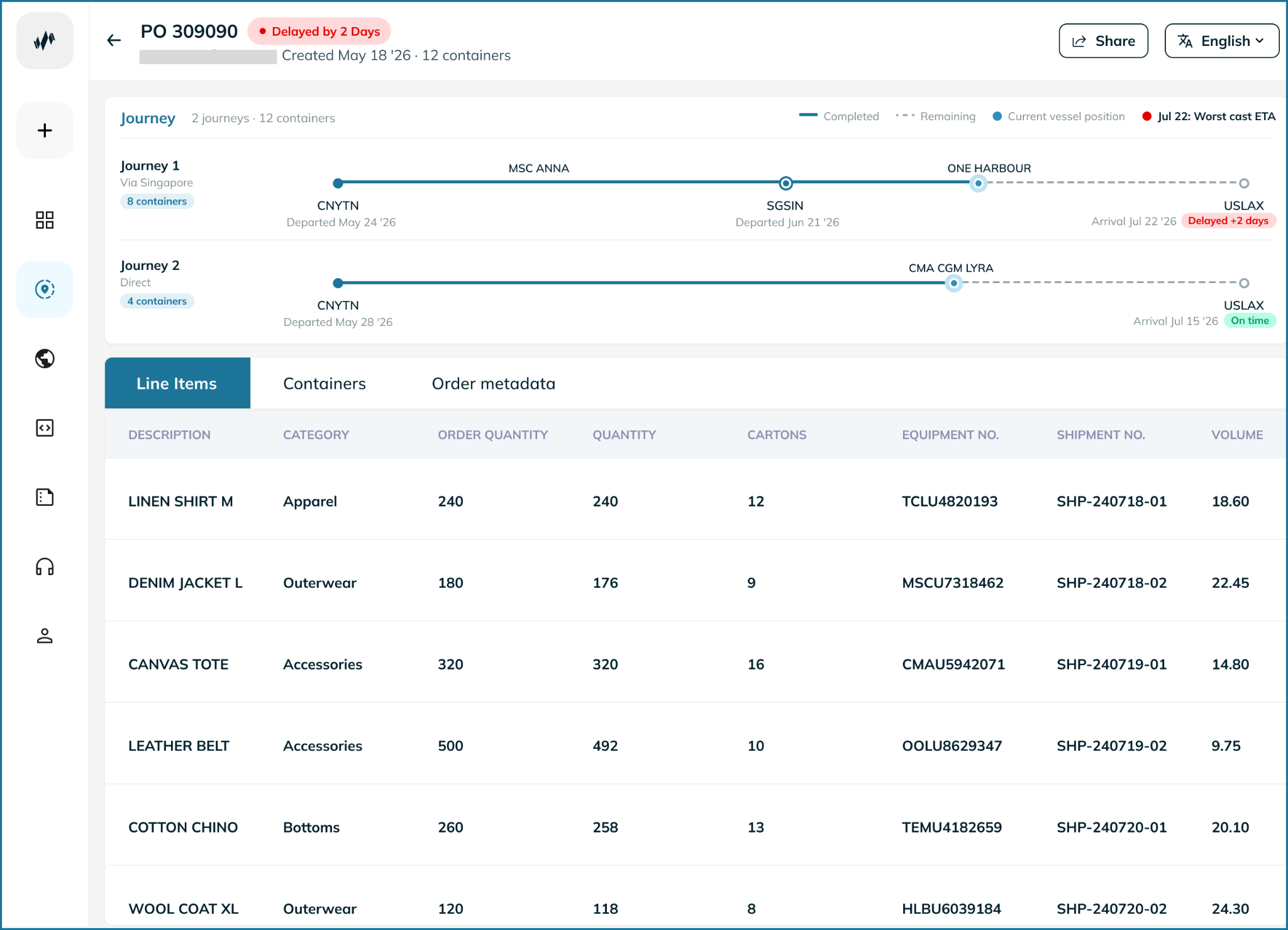
Now available in the Portcast platform, Order Intelligence connects purchase orders with real-time shipment visibility and delay risk in a single view. Instead of asking which containers are late, teams can see which orders are at risk, what is affected, and where to focus their attention.
What Risks Does Order Intelligence Help You Avoid?
When teams track containers instead of orders, important exceptions can stay hidden until it is too late to act. A container may look on track while part of an order is already at risk, or a delay may affect products and quantities that planners cannot easily identify.
Order Intelligence brings these risks into focus by connecting purchase orders, containers, bookings, products, quantities, and shipment ETAs in one view.
A split order falling behind
One purchase order can span multiple containers and bookings. When teams track shipments box by box, it is easy to miss that part of an order is falling behind.
An order is only fully on time when all of its shipments arrive on time. If nine containers arrive as planned but one is delayed, the order is still at risk.
Portcast links each PO to every container and booking carrying it, and shows the worst-case ETA for the order. Planners can quickly see when one delayed shipment puts the entire order at risk.
Not knowing what a delay affects
A delayed container is only part of the story. The real question is: what does the delay impact?
On the container page, the Order Data tab shows the POs, SKUs and quantities linked to that shipment. Instead of simply seeing that “container X is delayed,” planners can immediately see which orders and products are affected and decide what to do.
Missing changes to the original ETA
ETAs can shift gradually, making it hard to see how much an order has actually moved.
Order Intelligence compares the order's worst-case ETA with its initial ETA, making it easier to spot when an order has moved significantly from the original expectation.
Planning with the wrong quantities
Data quality issues can also create planning risks. When a declared order total does not match the sum of its line items, Portcast highlights the discrepancy with a warning.
This helps teams identify quantity mismatches before they start planning around incorrect information.
Different teams working from different views
When logistics teams work from container data while planners manage orders in spreadsheets, different teams can end up with different views of the same shipment.
Order Intelligence gives teams a shared order-level view, connecting the shipment, order, product and ETA data in one place.
The result is a clearer picture of what is on track, what is at risk, and where teams need to act first.
What Changes in Your Everyday Operations With Order Intelligence?
Order Intelligence connects your purchase orders to the shipments carrying them, giving your teams visibility across every container and booking. Instead of chasing multiple containers, planners can open one PO and instantly see the full picture.
Manage by exception: Filter for orders that are late or at risk and focus on what needs attention, instead of reviewing every shipment.
See the full order picture: Open a PO to see all related containers, bookings, products, quantities and ETAs in one place. No more spreadsheet reconciliation.
Work from either direction: Start with a PO or a container. See exactly which orders and products are connected, including quantities.
Keep teams aligned: Planning, procurement and logistics can work from the same view, using the language they already work with: orders, products, quantities and delivery dates.
Who Is Order Intelligence For?
Order Intelligence is built for BCOs and 4PLs managing freight at order level, especially in retail, consumer goods and industrial businesses where teams plan and track shipments by purchase order rather than container.
It is particularly useful for:
Operations and logistics teams: See which orders and products are affected when a shipment is delayed.
Planning teams: Work with shipment data in the same order-level view they already use to plan supply.
Digital procurement teams: Get a clear view of PO status without chasing updates across multiple shipments.
How Purchase Order Tracking Works
Order Intelligence connects your purchase order data directly to the shipments carrying it, giving you a complete view from order to delivery.
1. Connect your order data
Send your POs and line-item details through the Portcast API. You can share data at the container or booking/BL level, with both standard and custom order fields supported.
2. Connect orders to shipments
Portcast automatically links each PO to the containers and bookings carrying it. One order can span multiple shipments, while one container can carry multiple POs.
3. Track everything in one place
Your orders appear in a dedicated Order Tracking section and directly on each container page, giving your teams one clear view of what is moving, what is arriving, and what is at risk.
What's Included in Order Intelligence?
Order Intelligence gives your teams a clear view of every purchase order, from the products inside it to the shipments carrying them.
Order-level visibility
See every PO in one list, with its route, SKUs, quantities, containers, status and worst-case ETA compared with the original ETA. Quickly filter for active, in-transit, late or arrived orders.
SIngle Order View
Open any PO to see its line items, containers, bookings and order details. SKUs are consolidated across shipments, and you can add custom fields to match your existing data.
Order Data on the container page
Open any container to see every PO, SKU and quantity inside it. This makes it easy to understand exactly what a delayed shipment could impact.
Built-in data quality checks
When declared order totals do not match the sum of the line items, Portcast highlights the difference with a warning, helping teams spot data issues before they affect planning.
Availability
Order Intelligence is now available for ocean shipments.
For existing Portcast customers, access requires a purchase and API integration to connect your order data. If you already send PO data through custom fields, we can also support a migration to the new Order Intelligence setup.
If you'd like to learn more about order intelligence and other Portcast solutions, get in touch with us.
Frequently Asked Questions On Purchase Order Tracking
1. What is order intelligence
Order intelligence brings purchase order tracking and order-level delay risk into the Portcast platform. It links your POs and their line items to the ocean shipments that carry them. That lets you follow shipments by order and see which orders need attention.
2. How is order intelligence different from tracking containers?
Container tracking tells you where each box is. Order intelligence shows the order as a whole: every container and booking that carries part of a PO, what's inside each one, and when the full order is expected to arrive. Planning and logistics teams can work in terms of orders, products and quantities instead of container numbers.
3. How do I get my order data into Portcast?
You send your POs and line items through Portcast's API endpoints, at container level or booking/BL level. Both standard and custom order fields are supported. If you already send PO data to Portcast through custom fields, it can be migrated.
4. Can one PO be split across several containers, or one container hold several POs?
Yes, both. Portcast links each PO to every container and booking that carries it. The order view rolls each SKU up across all of those containers, and each container page lists every PO inside it.
5. How can I see which orders are at risk of delay?
The order list shows each order's worst-case ETA, meaning the arrival of its latest container, alongside the initial ETA. You can see how far an order has slipped and filter for late orders. When a single container is delayed, its Order Data tab shows which POs, SKUs and quantities are affected.
6. What happens if my order totals don't match the line items?
If a declared order total doesn't match the sum of its line items, Portcast shows both values with a warning. It doesn't pick one, so you can check the mismatch before planning around it.